

There comes a point in parenting when your child suddenly knows how to edit videos, join online games, send voice notes, and explain Wi-Fi problems better than most adults.
Wonderful.
Also slightly terrifying.
The tween years, usually around ages 9 to 12, are a tricky digital stage. Children are becoming more independent, more curious, and more socially aware, but they are still learning judgment, boundaries, impulse control, and how to spot when someone online is being dodgy. And online, “dodgy” can arrive wearing many outfits: a fake giveaway, a friendly stranger, a suspicious link, a gaming scam, or a message that says, “Don’t tell your parents.”
That last one, by the way, is the digital equivalent of a fire alarm.
Online safety for tweens should not be about fear. It should be about preparation. The aim is not to raise children who are scared of the internet. The aim is to raise children who can enjoy the internet with confidence, kindness, and a healthy amount of suspicion when someone offers them free Robux, V-Bucks, money, fame, or “exclusive access” in exchange for personal information.
The best approach is simple: don’t panic, don’t disappear, and don’t rely only on parental controls. Children need settings, yes. But they also need conversations, scripts, practice, and permission to come to you when something goes wrong.
Why Online Safety for Tweens Needs a Different Approach
Tweens are not little children anymore, but they are not teenagers either. They want privacy, friendship, fun, and independence. They may use games, messaging apps, video platforms, learning apps, and social media-style features, even when the platform itself is not technically “social media.”
This is why online safety has to go beyond “screen time.” While healthy screen-time habits for children matter, a child can have two hours online and be fine, or 10 minutes online and be exposed to a harmful message, scam, or inappropriate contact.
The NSPCC’s online safety guidance groups online risks into four broad areas: content, contact, conduct, and commerce. In normal parent language, that means what children see, who speaks to them, how they behave, and how money or scams may be involved.
That framework is helpful because it reminds us that online safety is not just about blocking “bad websites.” It is also about friendship, privacy, confidence, money, pressure, and decision-making.
In other words, the internet is not one big monster under the bed. It is more like a very busy shopping centre, playground, library, cinema, bank, and school corridor all squeezed into one glowing rectangle.
So yes, we need rules. But we also need relationship.
The No-Panic Rule: Connection First, Correction Second
Before we talk about privacy settings, DMs, and scams, let’s start with the most important safety tool: your child’s willingness to tell you the truth.
If children think they will lose their phone, be shouted at, or be blamed every time something goes wrong online, they may hide problems. That is when small issues can become bigger ones.
A useful family phrase is:
“You won’t be in trouble for coming to me. We will solve it together.”
This does not mean there are no consequences. It means the first response is safety, not shame.
Internet Matters advises parents of pre-teens to take an interest in children’s online lives by playing, browsing, and talking with them, because involvement makes it easier for children to raise concerns. That is important. Children are more likely to talk to adults who understand at least the basics of what they are doing online.
You do not need to become a gaming expert. You do not need to know every trend. You simply need to stay curious enough that your child does not feel they live in one world and you live in another.
Try asking:
“Show me your favourite game at the moment.”
“What do people usually message about on there?”
“Can strangers contact you?”
“What would you do if someone made you uncomfortable?”
These questions are much better than “What are you doing on that phone again?” said from across the room with the energy of a courtroom judge.
Privacy: Teach Children to Be Private by Default
Privacy is not just about hiding things. Privacy is about protecting choices.
Tweens often understand secrets, but they may not fully understand data. They may not realise that a photo, username, school badge, street sign, location tag, or birthday post can reveal more than they intended.
The ICO’s Children’s Code explains that online services likely to be accessed by children should follow standards designed to protect children’s data, including apps, games, connected toys, and online services. That matters, but parents should not assume platforms will do all the protecting. Settings still need checking.
A simple rule for tweens is:
Private information stays private unless a trusted adult says it is okay to share.
Private information includes:
- Full name
- Home address
- School name or school uniform
- Phone number
- Email address
- Passwords
- Live location
- Daily routine
- Family financial information
- Photos that reveal where they live, learn, or spend time
One overlooked privacy issue is the “background clue.” A child may not post their school name directly, but their school jumper may be visible in a video. They may not share their address, but a street sign may be in the background. They may not announce where they are, but a location tag may do it for them.
Online safety for tweens is partly about helping them think like detectives before they post.
Ask:
“What could someone learn from this photo?”
“Is there anything in the background we should crop out?”
“Would you be comfortable if everyone in your class, your teacher, and a stranger saw this?”
That last question is not perfect, but it often makes children pause. And with tweens, a pause is a parenting victory. Take it. Frame it. Put it on the fridge.
A Simple Privacy Checklist for Tweens
Parents can sit with their child once a month and check the following:
- Accounts are private where possible.
NSPCC guidance recommends using privacy controls to limit who can send friend requests, messages, or comments, and to turn off location sharing where appropriate. - Location sharing is off unless needed.
Many apps ask for location access when they do not truly need it. Teach children that “allow” is not the only option. - Usernames do not reveal personal details.
Avoid full names, birth years, school names, or local references. - Passwords are strong and not shared with friends.
The NCSC encourages families to secure accounts and protect personal data through trusted cyber security practices. - Two-step verification is turned on where available.
This helps protect accounts even if a password is guessed or stolen. - Friend lists and followers are reviewed.
A “friend” online should not automatically mean someone has earned access. - App permissions are checked.
Camera, microphone, contacts, and location settings should make sense for the app. - In-app purchases require adult approval.
UK Safer Internet Centre advises parents to use safety settings for purchases and avoid leaving card details on autofill where children have access.
This checklist is not about spying. It is about building the habit of digital maintenance, like brushing teeth but with fewer complaints. Hopefully.
DMs: Treat Direct Messages Like the Online Front Door
Direct messages can feel private and harmless. For tweens, they can also feel exciting. Someone wants to talk to them. Someone noticed them. Someone invited them into a group chat.
That is why DMs need clear family rules.
The simplest explanation is:
A DM is like someone knocking on your front door. You do not have to open it just because they knocked.
Children should know the difference between:
- People they know in real life
- Friends of friends
- Online-only contacts
- Strangers pretending to be children
- Adults who should not be contacting them privately
Not every unknown message is dangerous, but every unknown message deserves caution.
A good family DM rule is:
If someone you do not know messages you, do not reply until you have checked with a trusted adult.
Another important rule:
No secret conversations.
If someone says, “Don’t tell your parents,” “This is just between us,” or “You’ll get in trouble if you tell,” that is a red flag. Safe people do not need children to hide conversations from trusted adults.
Children also need practical scripts. In the moment, they may freeze or respond politely because they do not want to seem rude. So give them words.
Try these:
“I don’t chat privately with people I don’t know.”
“I need to ask my parent first.”
“Please don’t message me again.”
“I’m leaving this chat.”
And the strongest one:
No response at all.
Children often need permission to ignore people. That may sound simple, but many tweens are taught to be polite. Online, politeness must never come before safety.
When DMs Become Pressure
Some messages are not just friendly. They create pressure.
Examples include:
“Send a photo.”
“What school do you go to?”
“Are you alone?”
“Prove you trust me.”
“Click this link.”
“Join this private group.”
“Don’t be boring.”
“Everyone else is doing it.”
These are not normal friendship tests. They are pressure tactics.
The NSPCC encourages regular conversations with children about who they talk to online, what apps or games they use, and how online experiences make them feel. This is especially useful with DMs because children may not always identify something as unsafe, but they can often identify that it felt “weird,” “awkward,” or “too much.”
Teach your child to trust that feeling.
A helpful phrase is:
“If a message makes your stomach feel funny, show me.”
That is not scientific language, but it works. Children understand body signals before they understand safeguarding terminology.
Scams: The New Playground Trick
Many parents think of scams as adult problems: bank fraud, fake investment schemes, suspicious emails from someone claiming to be a prince with terrible grammar.
But children and tweens are targeted too. The scams may look different. They may appear through games, social media, messaging apps, fake giveaways, fake competitions, or links promising free digital items.
Ofcom has reported that online fraud is a major consumer harm, with scams appearing across online services, calls, texts, and apps. For children, the danger is not only losing money. It can also mean losing access to an account, sharing personal information, downloading malware, or being manipulated into secrecy.
Common tween scams include:
- “Free” game currency
- Fake giveaways
- Fake influencer accounts
- Fake brand competitions
- Links that steal passwords
- Messages claiming an account will be deleted unless they “verify”
- Requests for gift cards
- Fake online shops
- “Test this new game” download links
- “Vote for me” links that lead to phishing pages
The golden rule is:
If it creates panic, excitement, secrecy, or pressure, pause.
Scams often work by rushing people. Children need to know that real opportunities do not usually disappear in 30 seconds because a flashing button said so.
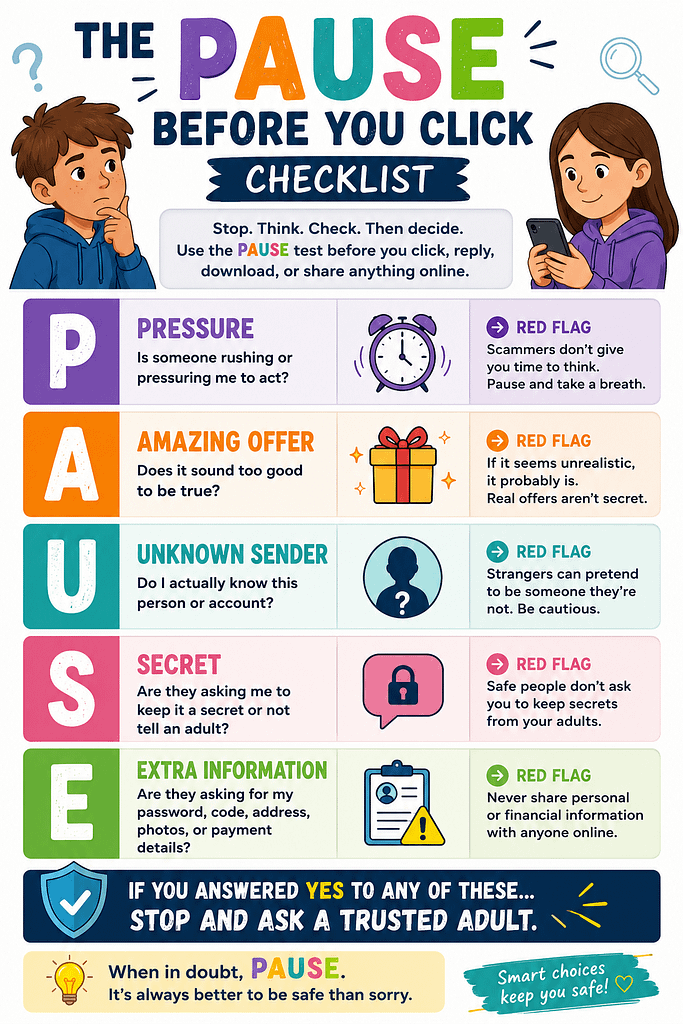
The PAUSE Test for Online Scams
Teach tweens this simple test before clicking, replying, downloading, or sharing:
P — Pressure:
Is someone rushing me?
A — Amazing offer:
Does it sound too good to be true?
U — Unknown sender:
Do I actually know this person or account?
S — Secret:
Are they asking me not to tell an adult?
E — Extra information:
Are they asking for my password, code, address, photo, or payment details?
If the answer is yes to any of these, stop and ask an adult.
This is the sort of online safety habit children can remember. Long lectures about cybercrime may make their eyes glaze over. “PAUSE before you click” is easier to use when the free-something button is glowing like treasure.
Passwords, Codes, and the “Never Share” Rule
Children may understand that passwords are private, but they may not understand that login codes are private too.
Many account takeover scams work by asking someone to share a code sent to their phone or email. The message may look harmless:
“I need your help getting back into my account.”
“Can I send a code to your phone?”
“Send me the six numbers.”
Teach your child:
A password is private. A login code is private. A recovery code is private. Even if the person asking sounds friendly.
No real friend needs your child’s password. No genuine company should ask for it in a DM. No giveaway needs it. No game moderator needs it.
A practical family rule:
Passwords are like toothbrushes. You do not share them. Not even with your best friend. Especially not with your best friend, because best friendships at age 11 can change by lunchtime.
What Parents Should Set Up Before There Is a Problem
Online safety works best before the drama.
Here are the basics:
- Use parental controls, but explain them.
Controls work better when children know they are safety barriers, not secret traps. - Turn on purchase approval.
This protects against accidental spending and scam-related purchases. - Use strong passwords and two-step verification.
Keep passwords unique for important accounts. - Keep devices and apps updated.
Updates often include security fixes. - Check privacy settings together.
Make this normal, not suspicious. - Agree on “show me” moments.
Your child should show you messages involving strangers, secrecy, threats, money, passwords, personal details, or uncomfortable requests. - Practise what to say.
Children are more likely to respond safely if they have rehearsed the words. - Create a no-blame reporting rule.
If they click something or reply to someone, they should tell you quickly.
UK Safer Internet Centre reminds parents and carers that they play a key role in helping children stay safe online and that they do not need to be internet experts to support them. That is worth remembering. You do not need to know everything. You need to stay involved.
What to Do If Your Tween Clicks a Scam Link
First, stay calm.
Yes, even if your soul briefly leaves your body.
Your child needs to see that telling you was the right decision. Start with:
“Thank you for telling me. We’ll sort it out.”
Then take practical steps:
- Do not enter any more information.
- Close the page or app.
- Change the account password from the official app or website.
- Turn on two-step verification if available.
- Check whether any payment details were used.
- Contact your bank if money or card details were involved.
- Report the message or account on the platform.
- Run a security check or antivirus scan where appropriate.
- Warn friends if the child’s account has sent suspicious messages.
In the UK, suspicious emails can be forwarded to the National Cyber Security Centre’s reporting address, and suspicious texts can be forwarded to 7726, according to Citizens Advice guidance. Scam websites can also be reported to the NCSC. If money has been lost or someone has been hacked because of an online scam or fraud in England, Wales, or Northern Ireland, Report Fraud provides online and phone reporting routes.
The main message for your child should be:
Mistakes can be fixed faster when they are shared sooner.
Build a Family Online Safety Agreement
A family agreement does not need to be a 12-page legal document. Nobody wants to sign the Terms and Conditions of Being in This Family.
Keep it simple.
Try this:
Our Family Online Safety Agreement
- We keep personal information private.
- We do not reply to unknown DMs without checking first.
- We never share passwords or login codes.
- We pause before clicking links, downloads, or giveaways.
- We tell an adult if something feels weird, scary, secretive, or pressuring.
- We are kind online, even when others are not.
- We can ask for help without being shouted at.
- We review settings together once a month.
Print it. Stick it somewhere visible. Revisit it regularly. The goal is not perfection. The goal is consistency.
The Bigger Lesson: Raise Digital Confidence, Not Digital Fear
The internet is part of children’s lives. It is where they learn, play, create, laugh, message friends, watch tutorials, and occasionally become deeply invested in things adults do not understand.
That is not automatically bad.
But children need guidance. Tweens especially need adults who can help them slow down, think clearly, protect their privacy, manage DMs, and recognise scams before they become problems.
Online safety for tweens is not one big dramatic conversation. It is a series of small conversations repeated over time.
At the dinner table.
In the car.
While setting up a new app.
After a strange message.
Before a new game.
When a friend gets hacked.
When a “free giveaway” looks suspiciously generous.
The no-panic approach is simple: stay close enough to guide, calm enough to be trusted, and practical enough to help.
Because the aim is not to remove every risk from your child’s digital life. That is impossible.
The aim is to make sure they do not face those risks alone.
And if they can learn to pause before clicking, question before sharing, and speak up before hiding, that is not just online safety.
That is life safety, with Wi-Fi.